Skip to product information
1 of 20

wishinabox

8-Port USB-C Hub for Laptop – HDMI + DP 4K, Ethernet, Card Reader & Audio Control

8-Port USB-C Hub for Laptop – HDMI + DP 4K, Ethernet, Card Reader & Audio Control

Regular price $131.13 AUD
Regular price $0.00 AUD Sale price $131.13 AUD
Sale Sold out
Shipping calculated at checkout.
Color
Quantity
0
Share
Product Overview

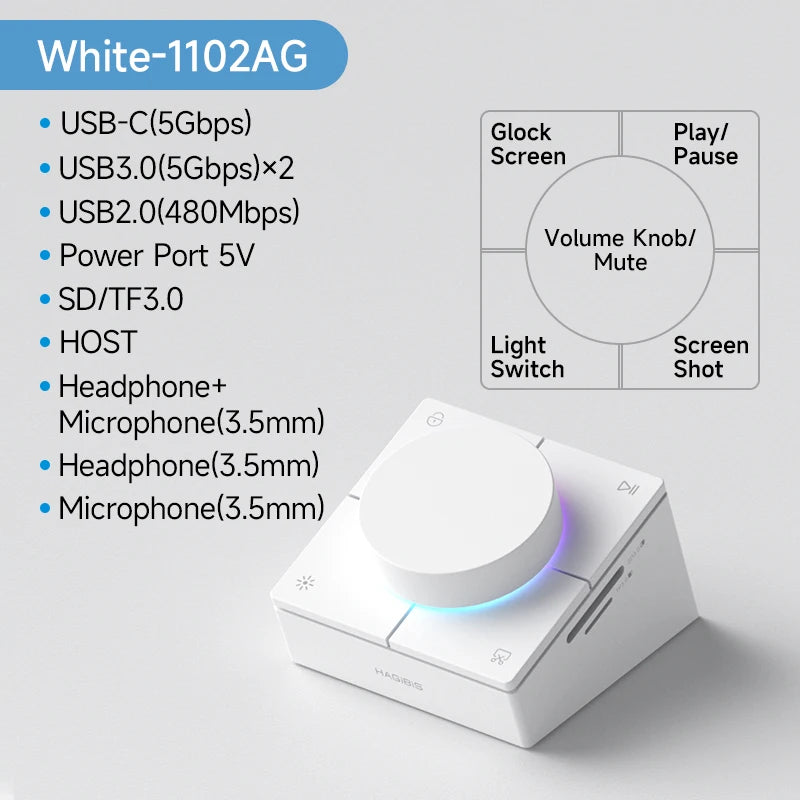
The Hagibis UC-1102AG 8-in-1 USB-C Hub Dock is a premium multifunction expansion hub designed for modern laptops. It removes interface limitations by combining high-speed data ports, 4K@60Hz HDMI, DisplayPort, Ethernet, card reader, audio jack, and a unique physical volume control knob with stylish RGB ambient lighting.

8-in-1 Expansion 4K@60Hz Output Volume Control Knob RGB Ambient Light
Designed for Work & Style: Powerful connectivity with tactile controls and desktop-grade aesthetics.
Key Features
  • 8-in-1 multifunction USB-C docking station
  • Physical volume knob – rotate to adjust, press to mute
  • RGB ambient lighting with selectable lighting modes
  • HDMI + DisplayPort support up to 4K@60Hz
  • High-speed USB-A and USB-C expansion ports
  • Integrated SD/TF card reader
  • Ethernet connectivity option for stable wired networking
Compatibility
  • Laptops with USB-C (USB 3.2 Gen 2 recommended)
  • Windows, macOS, Linux and other supported systems
  • USB-C ports must support video output for HDMI/DP
Note: Display output requires USB-C with DisplayPort Alt-Mode.
Specifications
  • Brand: Hagibis
  • Model: UC-1102AG
  • Interface: USB 3.2 Gen 2
  • Total Ports: 8
  • Video Output: HDMI + DP (up to 4K@60Hz)
  • Ethernet: Gigabit / 2.5G (version dependent)
  • Audio: 3.5mm jack with volume control knob
  • Lighting: RGB ambient lighting with mode switch
  • Certifications: CE, FCC, RoHS
Comparison
  • Standard USB-C hubs: Touch-only volume control, no lighting
  • Hagibis UC-1102AG: Physical volume knob + RGB + dual display output
Gift-Ready Highlights
  • Perfect for office desks and WFH setups
  • Premium look with RGB ambient lighting
  • Great gift for creators, professionals, and gamers
Desk Upgrade Essential: Functionality meets aesthetics.
How to Use
  • Connect the hub to your laptop via USB-C
  • Attach monitor(s), peripherals, and network cable
  • Rotate the knob to control volume, press to mute
  • Use the lighting key to switch RGB modes
What’s in the Box
  • Hagibis 8-in-1 USB-C Hub Dock ×1
FAQ / Important Notes
  • 4K@60Hz requires compatible laptop and display
  • Ethernet speed depends on selected version
  • USB-C cable quality can affect performance
View full details