Skip to product information
1 of 13

wishinabox

JUNDOF USB Dash Cam with ADAS – 720P HD Android Car DVR, LDWS & FCWS Safety Alerts (No Screen)

JUNDOF USB Dash Cam with ADAS – 720P HD Android Car DVR, LDWS & FCWS Safety Alerts (No Screen)

Regular price $28.37 AUD
Regular price $0.00 AUD Sale price $28.37 AUD
Sale Sold out
Shipping calculated at checkout.
Variant
Quantity
0
Share
πŸ“· Product Overview

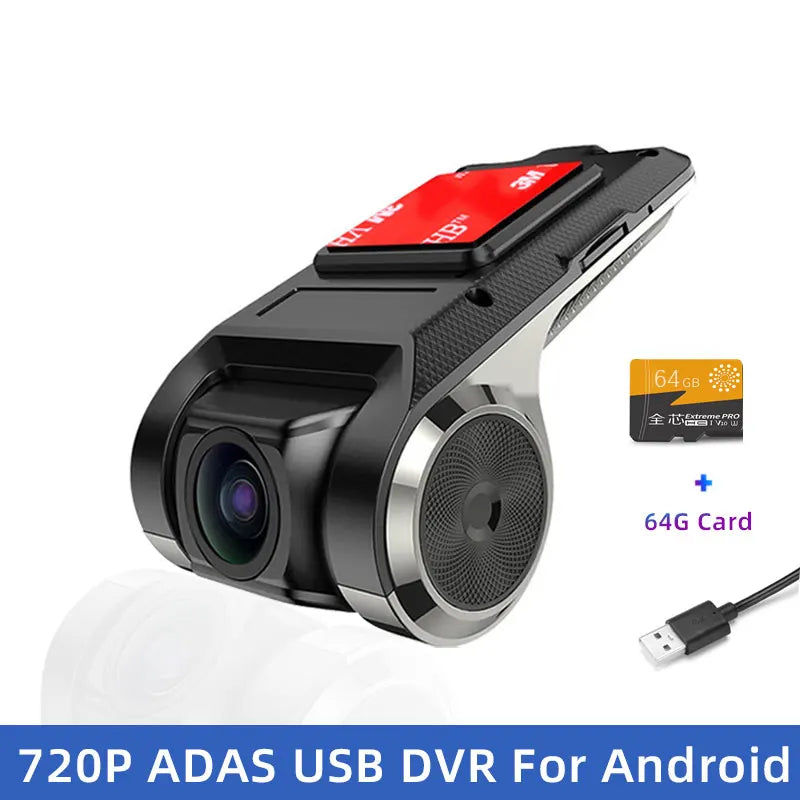
The JUNDOF USB Dash Cam with ADAS is a compact, screen-free car DVR designed to work directly with Android car multimedia systems. It delivers HD 720P recording, wide-angle coverage, and intelligent driving alerts without adding clutter to your dashboard.

πŸ‡¦πŸ‡Ί AU Road Safety Notice: Install and configure the camera while parked. ADAS alerts are assistance features only and do not replace safe driving practices.
✨ Key Features
  • πŸŽ₯ HD 720P video recording (1280Γ—720)
  • πŸš— ADAS driving assistance alerts
  • πŸ›£οΈ LDWS lane departure warning
  • ⚠️ FCWS forward collision warning
  • πŸŒ™ Night vision recording support
  • πŸ“ 150°–160Β° wide-angle lens
  • πŸ”Œ USB-powered via Android head unit
  • πŸͺŸ Floating window mode on Android screen
πŸ”— Compatibility
  • πŸ“± Android car multimedia systems (Android 4.0+)
  • πŸ’Ύ microSD / TF card support up to 64GB (Class 10)
  • πŸ”Œ USB 2.0 interface
  • 🚘 Suitable for most cars with Android head units
πŸ“¦ Specifications
  • Brand: JUNDOF
  • Item Type: USB Car DVR
  • Camera Resolution: 1280Γ—720 (HD)
  • Frame Rate: 25 FPS
  • Imaging Sensor: CMD OV7950
  • View Angle: 150°–160Β°
  • Video Format: AVI / MP4 (H.264)
  • Storage: microSD up to 64GB
  • Power Source: USB (vehicle powered)
  • Built-in Screen: No
  • Certification: CE
  • Warranty: 365 Days + 2 Years VIP
βš–οΈ Comparison
  • JUNDOF USB Dash Cam: ADAS alerts + Android integration + floating window
  • Standard USB Camera: Basic recording only, no driving assistance
🎁 Gift-Ready Highlights
πŸš— Driving Safety πŸ›£οΈ ADAS Alerts πŸ“· HD Recording 🎁 Practical Car Gift
πŸ› οΈ How to Use
  • Connect the DVR to the Android head unit via USB
  • Open file manager and run DVR.apk to install
  • Insert a Class 10 microSD card
  • Enable ADAS features in the app settings
  • Update software via WiFi if prompted
πŸ“¦ What’s in the Box
  • USB Dash Cam
  • 3.5m USB Cable
  • User Manual
  • Original Packaging
❓ FAQ / Important Notes
  • microSD card not included
  • No WiFi or Bluetooth phone connectivity
  • Video playback requires removing the SD card
  • ADAS functions depend on correct calibration
View full details